Got an invite?
Someone at your company invited you to their Ravenflows workspace. Here is what that means, and how to check it is real.
What Ravenflows is
A place where your team sees every screen of your app next to its design, sees which ones still work, and asks for changes in plain words. Your developers review every change before anything ships.
You will not set anything up, install anything or handle any keys. You sign in and land in your team's app, with a short tour.
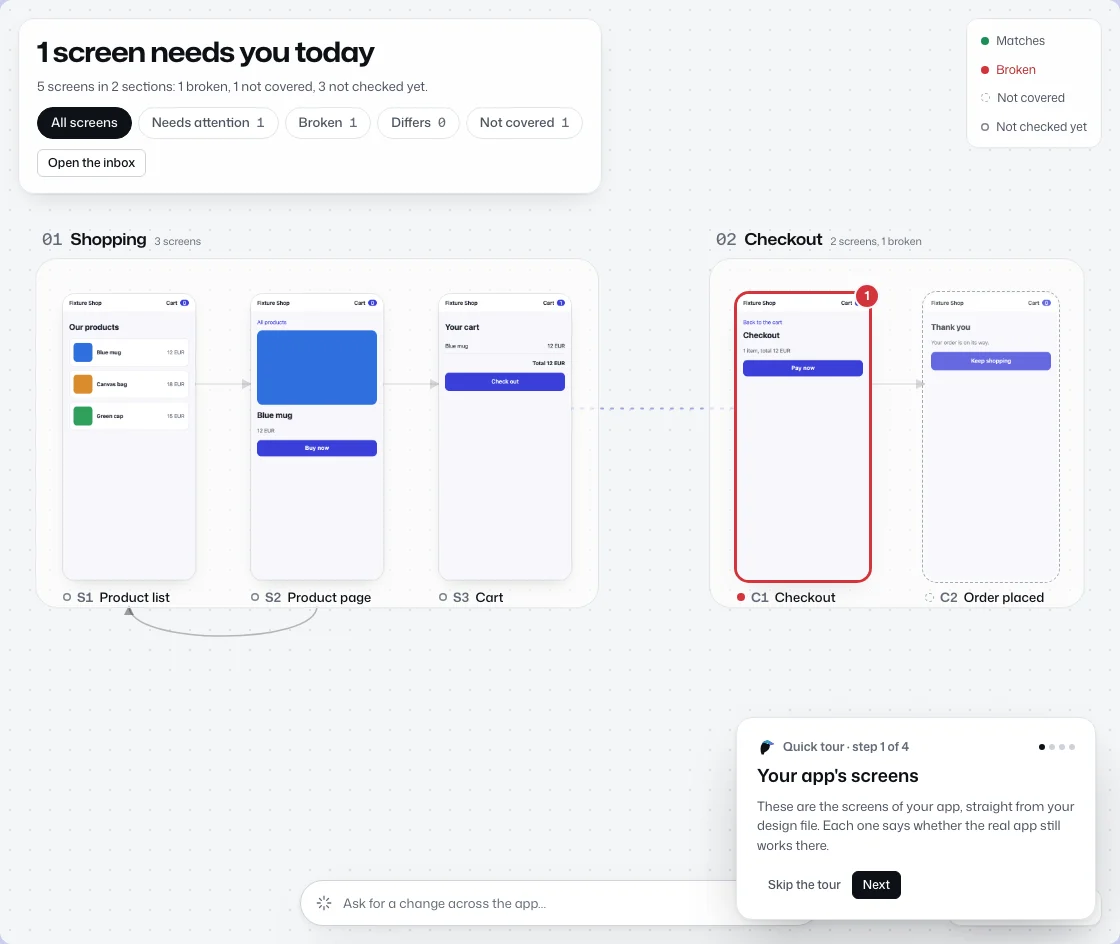
Who can invite you
Only the owner or an admin of your company's workspace. The email names the workspace and, usually, the person who invited you. It comes from no-reply@ravenflows.app.
What you will be able to do
The invitation gives you one role, Product unless the admin picked another.
| Role | What it can do |
|---|---|
| Viewer | Sees the map, the screens, comments and check results. Changes nothing. |
| Product | Product managers and designers: reviews screens, comments, checks a screen, asks the assistant for changes. |
| Developer | Also sees every check with its logs, maps flows to tests, sets what is checked and reads every assistant chat. |
| Admin | Also connects accounts, manages people, sets the assistant rules and reads the audit log. |
Is it safe?
- The link works for 7 days and only for the email address it was sent to.
- You sign in with your Google account, on Google's own page. We never ask for a password.
- The real link starts with https://app.ravenflows.app/invite/.
- Nothing happens if you ignore it. The link simply expires.
Not expecting it?
It is safe to ignore. If you want to check, ask the person or team named in the email through a channel you already use, like your company chat. Ask that way rather than by replying to the email.
Still unsure? Forward it to support@ravenflows.app.